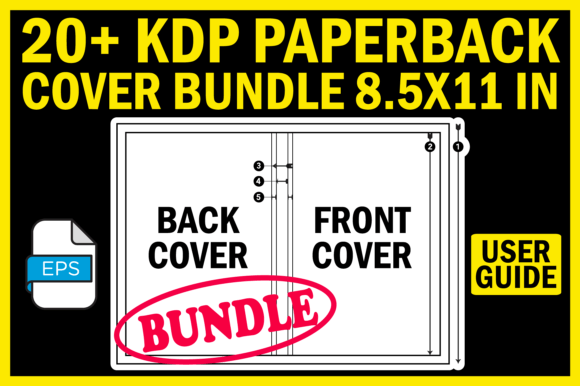
20 KDP Paperback Cover Bundle 8.5X11 in: Strategic Templates for Efficient Publishing
Creating a paperback cover for Kindle Direct Publishing looks simple until you confront the exact dimensions required for your specific page count. A single pixel off on the spine width or a miscalculated bleed area can delay your launch or result in a rejected file. The 20 KDP Paperback Cover Bundle 8.5X11 in directly addresses this friction point, offering a set of pre-sized templates that align with the most common trim size while accommodating the varying spine widths that come with different page counts.
If you have ever found yourself repeatedly adjusting margins or second-guessing whether your cover meets KDP guidelines, this bundle provides a practical foundation. It is not about aesthetics or artistic flair. It is about precision, consistency, and removing a recurring operational bottleneck from your publishing workflow.
What the 20 KDP Paperback Cover Bundle 8.5X11 In Actually Provides
At its core, this bundle delivers twenty individual EPS templates, each corresponding to a specific page count ranging from 30 pages up to 180 pages and beyond. Every template is set at 300 DPI resolution, which is the minimum standard for print quality but generous enough to retain detail for most cover designs. The bundle also includes a CoverSizeGuide.jpg that visually breaks down each part of the cover, so you understand where the front, back, spine, and bleed zones are located before you place a single element.
A ReadMe.txt file accompanies the package, offering a straightforward user guide. The EPS format is widely supported across professional design software, including Adobe Illustrator, Affinity Designer, and CorelDRAW, making the bundle accessible whether you work on a Mac or Windows machine.
For anyone publishing multiple books in the 8.5 by 11 inch format, this bundle eliminates the need to manually recalculate spine width every time your page count changes. Instead of stopping your creative flow to research KDP specifications, you open the correct template and begin working immediately.
Why Exact Sizing Matters More Than Most Publishers Realize
KDP enforces strict tolerances on cover files. If your spine is even slightly misaligned, your printed book will look off-center on the shelf. If your bleed area is missing or undersized, KDP may reject the file outright or print it with unwanted white edges. These issues are not rare. They are common enough that many self-publishers lose hours or days reworking files for what amounts to a simple measurement error.
The 20 KDP Paperback Cover Bundle 8.5X11 in removes that variable. Each template is constructed to KDP specifications for its corresponding page count. You are not guessing. You are not measuring. You are placing your design onto a canvas that already accounts for the unique geometry of your book.
This is especially relevant for professionals who publish across multiple categories, such as educators creating workbooks, marketers producing lead magnets, or freelancers assembling portfolios. When you scale your publishing output, the overhead of recreating covers from scratch becomes unsustainable. Templates serve as a repeatable system rather than a one-time fix.
Strategic Use Cases for Different Publishing Goals
Understanding what you are publishing helps determine how you should approach these templates. The value is not the same for every project. Consider a few distinct scenarios.
Workbooks and Educational Materials
If you produce training manuals, course workbooks, or teaching resources, the 8.5 by 11 inch trim size is often the default choice because it accommodates worksheets, diagrams, and wide margins for note-taking. Using the 20 KDP Paperback Cover Bundle 8.5X11 in allows you to maintain a consistent brand look across a series of books with different page counts. You can use the same background image, same typography, and same color scheme, only changing the spine width to match each volume. This creates a cohesive product line that looks intentional and professional, which in turn builds trust with your audience.
Portfolios and Creative Showcases
Freelancers, photographers, and designers sometimes produce printed portfolios to present to clients. The 8.5 by 11 inch size is large enough to display work without being unwieldy. Having a set of templates means you can quickly produce a portfolio at 40 pages for a pitch meeting and a more comprehensive 100-page version for a gallery show, without starting the cover layout from zero each time. The high resolution ensures that images remain sharp, and the guide file helps you avoid placing critical visual elements too close to the trim edge.
Short Reports and Business Documents
Small business owners may publish reports, case studies, or company overviews as paperbacks to distribute at events or to clients. A 30-page or 50-page document can feel thin, but a well-designed cover makes it seem substantial. The templates in this bundle for lower page counts help you avoid the common mistake of overcompensating with oversized text or graphics. Because the spine area is smaller for thin books, you need to be deliberate about whether to include text on the spine at all. The cover guide helps you make that judgment visually.
How to Approach the Templates Intentionally, Not Randomly
A template is a tool, not a crutch. The risk of using 20 KDP Paperback Cover Bundle 8.5X11 in without a clear intention is that your covers end up looking generic or misaligned with your content. To avoid that, think of the template as the structural skeleton of your cover. You still need to supply the visual personality that reflects your topic and audience.
Start by defining the one message your cover must communicate. Is it credibility? Curiosity? Urgency? Utility? Once you know that, choose your imagery, colors, and typography to support that message within the dimensions the template provides. The template ensures that your design stays within the safe zones, but it does not tell you what to put there. That is your strategic decision.
Another consideration is the relationship between your cover and your interior formatting. If your interior uses a particular font or color accent, carrying those elements onto the cover creates a unified reading experience. The template gives you the canvas; your content gives you the design language.
Decision-Making Guidance for Choosing the Right Template
When you open the bundle, you will see separate files for 30, 40, 50, 60, 70, 80, 90, 100, 110, 120, 130, 140, 150, 160, 170, and 180 pages. Selecting the correct one is straightforward if you know your final page count. However, if you are still writing or formatting your interior, leave the cover until the final interior file is complete. The page count must be exact. KDP bases the spine width on the total number of pages, including front matter and back matter. An estimate is not sufficient.
If your book falls between the provided page counts, choose the next higher count and adjust the spine width manually using the CoverSizeGuide.jpg as a reference. The guide explains how each zone is measured, allowing you to modify the template if your exact count is not included. This is a rare situation, but knowing how to handle it prevents frustration.
For books exceeding 180 pages, you may need to check whether the bundle includes templates beyond that range. The description mentions 180 pages and continues with ellipses, suggesting additional templates or the ability to extrapolate from the existing ones using the guide.
Practical Workflow Integration
Integrating these templates into a repeatable workflow saves time across multiple projects. Create a folder structure where each book project contains a subfolder for covers. When you start a new book, copy the correct template into that folder. Name the template file with your book title and the page count. This simple habit prevents confusion later when you have multiple books in production.
If you collaborate with a designer, sending them the correct template along with your style guide eliminates back-and-forth about dimensions. Designers appreciate receiving files that are already calibrated for the output format. It signals that you understand the technical requirements and respect their time.
For those who use design software that does not natively open EPS files, convert the template to a format your software supports, such as PDF or AI, maintaining the 300 DPI resolution. Avoid converting to JPEG or PNG for editing purposes, as those formats compress layers and limit your ability to adjust individual elements.
Potential Risks of Using Templates Without Strategic Context
The most common mistake is treating the template as a design solution rather than a dimensional framework. A perfectly sized cover with weak typography, low-contrast colors, or cluttered composition will not perform well on Amazon, regardless of how accurate the spine width is. The template prevents technical rejection, but it does not guarantee a compelling visual.
Another risk is over-reliance on the bundle for every project without questioning whether 8.5 by 11 inches is the right size for that particular book. Some topics benefit from a smaller trim size, such as 6 by 9 inches for narrative nonfiction or 5 by 8 inches for fiction. Using the 8.5 by 11 inch size because you have templates for it, rather than because it suits your content, can lead to a book that feels awkward in the reader's hands. Do not let convenience override appropriateness.
Finally, if you skip reading the ReadMe.txt or ignore the CoverSizeGuide.jpg, you might place critical text or logos in areas that get trimmed. The guide exists to prevent that, but only if you consult it. Treat each file in the bundle as part of a system, not as standalone elements.
Long-Term Value for Publishers and Content Creators
Investing in a bundle like this makes the most sense when you plan to publish multiple titles over time. The initial cost, whether monetary or simply the time to learn the template structure, pays dividends as you reuse the system. Each subsequent cover takes less time than the previous one because you are iterating within a known framework.
For educators who produce a new workbook each semester, or for marketers who release annual reports, the consistency across covers builds brand recognition. Readers who see a familiar layout and quality level are more likely to trust the content inside. Over years of publishing, that consistency compounds into a reputation for professionalism.
Moreover, understanding how KDP cover dimensions work gives you a deeper grasp of print production in general. The experience you gain from working with these templates translates to other formats and platforms. You are not just buying a set of files. You are learning a repeatable skill.
Final Considerations Before Downloading and Using the Bundle
Before you begin, confirm that your design software supports EPS files and that you have the ability to edit layers and text. If you work exclusively with browser-based design tools that do not support EPS, you may need to convert the files or use a different approach. The bundle is designed for users who have at least basic proficiency with professional design software.
Set realistic expectations for your first cover. Even with a perfect template, you will likely make adjustments as you learn how your design choices interact with the bleed and trim zones. Allow time for at least one test print or a thorough digital review before submitting to KDP. The CoverSizeGuide.jpg is your primary reference, but nothing replaces a careful visual inspection.
If you are publishing for an audience that expects a specific visual style, such as minimalist, bold, or academic, use the template as a constraint that forces clear thinking. Limited space on the spine for thin books, for example, encourages you to distill your message to its essence. That discipline often improves the overall design.
Ultimately, the 20 KDP Paperback Cover Bundle 8.5X11 in is a practical instrument for anyone who values efficiency without sacrificing accuracy. It solves a specific technical problem, freeing you to focus on the creative and strategic decisions that actually differentiate your book. Use it as part of a deliberate publishing system, and it will serve you well across many projects.