Income and Expense Log Book KDP Interior: What to Check Before You Publish
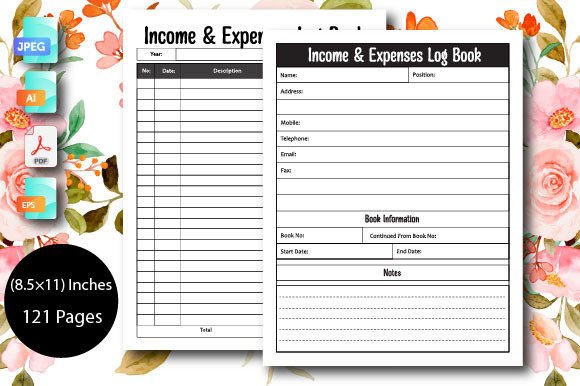
If you are exploring low-content publishing on Amazon KDP, you have likely come across the Income and Expense Log Book KDP Interior. This type of product is popular among self-publishers because it serves a real need: helping small business owners, freelancers, and creators track their finances without complicated software. The version described here comes as a fully editable, 121-page interior with no bleed, available in AI, PDF, EPS, and JPEG formats at 8.5×11 inches. It claims to be 100 percent editable and ready for printing. That sounds straightforward enough, but many first-time publishers make avoidable mistakes when working with interiors like this one. This article walks through what to watch out for and how to get better results.
Understanding What This Interior Actually Offers
Before you download or buy any Income and Expense Log Book KDP Interior, take a moment to understand what it contains. A log book interior of this type typically provides pre-designed pages where users can record income sources, expenses, dates, categories, and totals. The 121-page count gives room for extensive tracking, and the multiple file formats mean you can edit the design in vector software like Adobe Illustrator or use the PDF version directly.
One detail that often gets overlooked is the "no bleed" specification. Many beginners assume this means the interior is automatically ready for KDP, but no bleed simply means there are no design elements extending to the edge of the page. You still need to set your document margins correctly for the platform. If you skip that step, your content may appear too close to the edge when printed.
Another common misunderstanding is that "100 percent editable" means you can change anything without limitations. In practice, editing depends on the software you use and the structure of the vector files. Some interiors use locked layers or grouped objects that require a bit of know-how to modify. Always open the files immediately after purchase to confirm they work in your preferred program.
Assuming All File Formats Are Equal
The product listing mentions AI, PDF, EPS, and JPEG formats. Each serves a different purpose. AI and EPS are vector formats best for editing in professional design software. PDF is great for direct upload to KDP if you do not need changes. JPEG is a raster format that loses quality if resized. A common mistake is downloading only the JPEG version and trying to edit it at full size, which leads to pixelation and blurry text. If you plan to modify the interior extensively, use the AI or EPS file. If you want a quick upload with no changes, use the PDF.
Check that the vector files you receive actually contain editable text layers. Some interiors convert text to outlines to preserve fonts, but that makes it impossible to edit the wording later. If you need to change headers or labels, confirm the text remains editable before you start building your book.
Ignoring the Page Count Requirements
KDP has minimum and maximum page count rules depending on the book type and printing method. A 121-page interior might meet those requirements, but you also need to consider whether that number includes blank pages, title pages, or copyright pages. Sometimes the count includes front matter that you may want to customize. If your interior has only 120 pages of actual log content, and you add your own front matter, you could push the total outside KDP's guidelines or affect the spine width calculation for paperbacks.
Count the actual content pages yourself. If you plan to add more pages—the product description says "you can add however much you need"—ensure your editing software can handle that without breaking the layout. Some interiors use master pages or templates that do not extend well beyond the original design. Test adding a few extra pages before committing to a large project.
Overlooking Bleed and Margin Settings
Even though the interior says "no bleed," you still need to set up your manuscript margins correctly for KDP. The platform requires a minimum margin size depending on your page count and binding type. For a book with 121 pages, the standard margin might be around 0.5 inches. If you import the PDF directly without adjusting margins, some content near the edges could get trimmed or become difficult to read after binding.
Open the PDF in a viewer and use the measurement tool to check the distance between the content and the page edge. If it looks tight, you may need to adjust the layout in the vector file before exporting. This step is easy to skip, but it directly affects the quality of the printed book and the customer's experience.
Customize Before You Upload
A common mistake is uploading the interior exactly as downloaded, with generic headers and placeholder text. Buyers on KDP appreciate interiors that feel tailored to a specific use case. For instance, if you are targeting freelancers, adjust the category labels to match common freelance expenses like subscriptions, software, travel, and client meals. If your audience is small business owners, include sections for cost of goods sold, payroll, and inventory.
Use the vector file to rename headers, add your own branding elements, and adjust the date ranges. A simple customization like changing "Income Source" to "Client/Project Name" can make the log book feel more relevant to your niche. This also reduces the chance of customers leaving negative reviews because the interior felt too generic.
Test the Print Quality Before Publishing
Even with high-quality resolution interiors, previewing on screen is not enough. Order a proof copy from KDP or print a few pages on your own printer using the same paper type you plan to use. Look for issues like faint text, inconsistent line weights, or ink bleed on thin paper. The product description mentions "high-quality resolution interiors," but that refers to the digital file. How it looks on paper depends on your export settings and the printer.
Export your final PDF in CMYK color mode if possible, and set the resolution to at least 300 DPI. These settings help maintain sharp lines and text when printed. If the interior includes any shading or background colors, check that they do not overpower the log sections or make handwriting difficult to read.
Check the License and Usage Rights
This interior is described as being "perfect for your low no content publishing business," which implies commercial use is allowed. However, always verify the license terms before uploading to KDP. Some interiors come with restrictions on how many books you can publish, whether you can resell the template, or whether you need to attribute the original designer. If the license is unclear, contact the seller or designer directly. A misunderstanding later could result in your book being taken down or your account penalized.
If you plan to use the interior for multiple books, confirm that the license allows unlimited use. Some sellers offer extended licenses for an additional fee. Knowing these details upfront saves you from legal headaches and lets you scale your publishing efforts confidently.
What to Check Before You Buy
- Format compatibility. Do you have the software to open AI or EPS files? If not, will the PDF version meet your needs without editing?
- Page count flexibility. Can you easily add or remove pages without breaking the layout? Test this with the sample file if one is available.
- Text editability. Are the fonts embedded, outlined, or linked? Outlined text cannot be changed, so choose accordingly.
- Bleed and margin specs. Does the interior already have adequate margins for KDP, or will you need to adjust them?
- Preview quality. Does the sample PDF look crisp at full zoom? Blurry samples often indicate low resolution originals.
- License scope. Does the license allow commercial use, modifications, and multiple titles?
Taking these steps before you purchase prevents wasted time and money. It also ensures the interior you choose actually supports the type of book you want to publish.
Better Approaches for Different Audiences
If you are a beginner, start with the PDF version and use it as-is for your first title. Focus on writing a clear product description that explains exactly who the log book is for and how it helps. If you are a professional designer or experienced publisher, invest time in customizing the vector file to create a unique product that stands out from similar listings. Small changes in layout, color accents, or category labels can differentiate your book in a crowded marketplace.
For entrepreneurs and small business owners who plan to use the log book themselves, the editable nature of this interior is a major advantage. You can adapt the categories to match your actual income streams and expense patterns. That makes the book more useful than a generic ledger, and it can save you hours of manual setup.
Content creators and bloggers often use interiors like this to offer free or low-cost resources to their audience. If that is your goal, consider branding the interior with your logo or website URL. The vector files make this easy to do, and it adds professional polish to the final product.
Final Thoughts on Working with This Interior
The Income and Expense Log Book KDP Interior can be a strong addition to your low-content publishing lineup when handled correctly. The 100 percent editable vector files, multiple format options, and clear no-bleed layout give you genuine flexibility. The most common issues arise from assumptions—assuming the PDF is ready to upload, assuming all formats work the same way, or assuming the license covers every use case. By verifying file structure, margins, page count, and editability early, you avoid surprises and deliver a polished product to your customers.
Keep in mind that the interior is a tool, not a finished book. Your decisions about customization, target audience, and formatting determine how well it performs. Take the time to test, adjust, and proof your work. That effort separates amateur listings from professional ones, and it builds trust with buyers who rely on your products for their own business or personal record-keeping.