Editable Teacher Planner: The Ultimate Organizational Tool for Modern Educators
Teaching is one of the most rewarding professions, but it comes with an immense amount of paperwork, scheduling, and record-keeping. From lesson plans to student data, from classroom volunteers to professional development logs, the sheer volume of tasks can quickly become overwhelming. Enter the Editable Teacher Planner KDP—a flexible, customisable solution designed to bring order to the chaos. Whether you are a veteran educator or a new teacher fresh out of training, having a structured planner that you can adapt to your specific needs is no longer a luxury; it is a practical necessity. This article explores what makes these planners essential, how they fit into modern teaching workflows, and why the editable Canva interior format is gaining traction among educators and creators alike.
What Is an Editable Teacher Planner KDP?
An Editable Teacher Planner KDP is a digital product—typically a set of templates—that teachers can download, customise, and print or use digitally. The acronym KDP stands for Kindle Direct Publishing, but in this context, it refers to the popular niche of printable planners sold on platforms like Amazon KDP. These planners are often created using tools like Canva, which allows for easy editing without specialised design skills. The product described here includes an editable Canva link, meaning you can personalise every page before printing. It comes with ready-to-use JPG, PNG, and PDF files for instant download, making it extremely convenient.
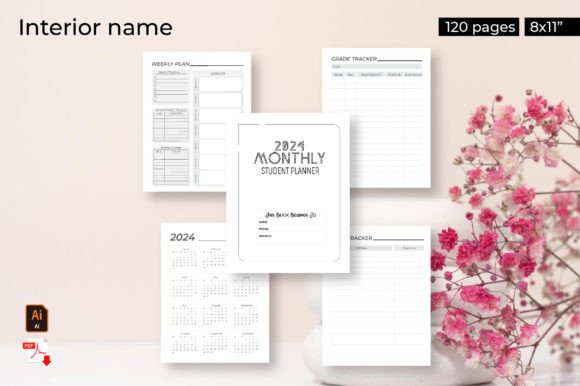
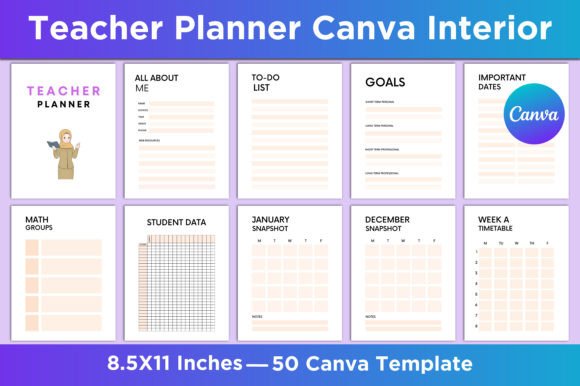
The planner is packed with over 50 pages covering everything from a teacher's personal goals to daily lesson plans. Key sections include an "All About Me" page, to-do lists, SMART goals, important dates, class birthdays, reading/writing/math groups, student data snapshots, semester and term plans, weekly timetables (including variations A and B), daily plans with five unique layouts, lesson plans, professional learning logs, classroom volunteer trackers, anecdotal notes, daily/weekly/monthly teacher planners, homework logs, class planners, and more. It even ends with a thank-you page. The pages are sized at 8.5x11 inches, with no bleed, at 300 DPI for crisp printing.
Why Teachers Are Turning to Editable Planners
The teaching profession has evolved significantly in recent years. Increased administrative demands, diverse classroom needs, and the shift toward data-driven instruction mean that teachers must keep meticulous records. A standard pre-printed planner often falls short because it cannot accommodate the unique structure of every classroom. That is where editable planners shine. They allow teachers to modify fields, add or remove pages, and change fonts or colors to match their personal style or school branding. The flexibility is a game-changer.
Moreover, many teachers now prefer digital workflows. They may fill in their planner on a tablet or laptop during planning periods, then print only the pages they need. The availability of high-quality ready files (JPG, PNG, PDF) ensures compatibility across devices. The editable Canva link takes it a step further: you can access the template online, make changes, and export instantly. This aligns with the broader trend of remote and hybrid work, even within schools. Teachers are spending more time planning at home or in collaborative settings, and having a cloud-based editable resource is invaluable.
The Growing Popularity of Canva Interiors for Teacher Planners
Canva has become a powerhouse for non-designers who want to create professional-looking materials. For teacher planner creators, offering an editable Canva link is a smart move. It empowers the buyer to tweak the layout without needing expensive software like Adobe InDesign. The product mentioned includes "Editable Canva Link you can Customize it based on your requirement." This means the end user can change text, swap images, adjust colors, and even rearrange elements. It puts the teacher in control.
From a market perspective, this trend reflects a desire for personalization. Teachers are not a monolith; a kindergarten teacher needs a very different planner than a high school science teacher. By providing 50 different templates within one product, the planner covers a wide range of needs. For example, a "Weekly Timetable" might be perfect for an elementary teacher who rotates subjects daily, while a "Semester Plan" suits a secondary teacher who plans by unit. The inclusion of both "Weekly A Timetable" and "Weekly B Timetable" caters to schools with alternate weekly schedules, which is common in many districts. This level of nuance shows an understanding of real classroom logistics.
Practical Implications for Users and Creators
For teachers, the immediate benefit is time saved. Instead of creating a planner from scratch or trying to squeeze their schedule into a generic template, they can start with a comprehensive foundation. The "Student Data Snapshot" pages (two pages) and monthly snapshots from January to December are particularly useful for tracking IEP goals, assessment scores, or behavioral notes. The "Anecdotal Notes" section is a lifesaver for documenting informal observations that later inform report cards or parent conferences. The "Professional Learning" page helps teachers log continuing education credits or workshops, which is often required for license renewal.
For creators on KDP or selling digital products, this type of planner is a strong niche. The education market is huge, and teachers are willing to invest in tools that save them time. By offering editable files, creators reduce the barrier to purchase—buyers know they can adapt the planner to their needs. Including multiple file formats (JPG, PNG, PDF) also appeals to different users: some want to print directly from PDF, others want to use images in GoodNotes or similar apps. The "No Bleed" specification is important for those printing at home, ensuring that content stays within the printable area.
How to Make the Most of the Editable Teacher Planner
Once you download the planner, start by exploring the range of pages. Identify which ones are essential for your teaching style. For example, if you teach multiple subjects, the "Math Groups," "Reading Groups," and "Writing Groups" pages will help you organise differentiated instruction. Use the "Important Dates" page to map out holidays, testing windows, and school events. The "Helpful Hints" page is a simple but effective space to jot down reminders from veteran colleagues.
Next, customise the editable Canva template. Change the colors to match your classroom theme or grade level. Add your name to the "All About Me" page. Adjust the weekly timetable to show your actual prep periods and lunch breaks. The beauty is that you can delete pages you don't need and duplicate pages you love. For instance, the "Daily Plan 5 Unique Page" offers five different layouts—you might select two that work best and copy them for each day of the week. The "Lesson Plan" page can be duplicated for every subject.
Print in batches. You don't have to print all 50 pages at once. Pick the pages you need for the upcoming month, print them, and bind them with a spiral or ring binder. The 8.5x11 inch size is standard and fits most planners. Since it's 300 DPI, the text and graphics will be sharp. Alternatively, use the PDF on a tablet with a note-taking app like GoodNotes or Notability, and save paper entirely. The JPG files are perfect if you want to import individual pages as images into a digital notebook.
Meeting the Needs of Modern Classrooms
Today's classrooms are more diverse than ever. Teachers must track English language learners, students with 504 plans, gifted students, and those needing intervention. The "Student Date" page (possibly a typo for "Student Data") and the "Snapshot" pages allow for quick reference. The "Class Planner" and "Homework Log" keep communication clear with families. The "Classroom Volunteers" page helps manage parent helpers—a huge timesaver during field trips or literacy rotations.
Moreover, many teachers now collaborate in grade-level teams or professional learning communities (PLCs). The planner's "Professional Learning" and "Teacher Notes" sections can be used to document collaborative discussions, common assessments, and strategies. The "Teachers Daily Planner," "Teachers Weekly Planner," and "Teachers Monthly Planner" offer different scopes—daily entry for granular tasks, weekly for overview, monthly for big-picture deadlines. This layered approach aligns with how teachers think: some mornings you need a detailed to-do list, other times you need to see the whole month at a glance.
Recommendations for Effective Use
Start the school year by filling out the "Goals" and "SMART Goals" pages. Research shows that goal-setting improves focus and outcome achievement. Then set up your "Semester Plan" and "Term Plan" based on your curriculum map. Use the "Important Date" page to mark all major events. Don't forget to add class birthdays—students love it when teachers remember. Keep the "Teacher Notes" section handy for those brilliant ideas that pop up during lunch or while driving home.
Regularly review the "Professional Learning" page to ensure you're on track with certification requirements. The "Anecdotal Notes" page is best kept digital if you have a tablet—you can type faster than handwriting, and it's easier to search later. But if you prefer paper, print extra copies. The "To Do list" and "Teacher Notes" are simple but effective—use them daily to avoid forgetting tasks.
Why Editable Teacher Planners Are Here to Stay
The education sector is increasingly digitised, but paper planners remain popular because they offer a break from screen time. An editable planner bridges the gap: customise digitally, then use in print. As more teachers become comfortable with Canva and similar tools, the demand for editable products will only grow. For creators, this is an evergreen niche. Teachers buy new planners every school year, and many prefer to purchase a single editable template that they can reuse year after year, just updating the content.
The product described here—with its 50 templates, multiple file types, and Canva link—exemplifies what modern teachers want: control, variety, and ease of use. Whether you are a teacher looking to streamline your planning or a creator aiming to serve this market, the Editable Teacher Planner KDP offers a flexible, practical solution. It respects the professional’s time while providing the structure needed to thrive in a demanding role.
Ultimately, a good teacher planner is more than paper and ink. It’s a daily companion that helps you stay organized, reduces stress, and allows you to focus on what truly matters: your students. With an editable version, that companion can be truly personal—adapted to your unique classroom, your teaching style, and your goals. So take the time to customise it, print it, and use it consistently. You'll wonder how you managed without it.