Goal Action Planner: Your Blueprint for Turning Dreams into Real Results
You have a goal. Maybe it’s launching a business, writing a book, getting fit, or finally organizing your home office. But having a goal isn’t the same as making progress. The gap between intention and achievement is often just a lack of structure. That’s where a Goal Action Planner comes in. An Action Planner isn’t just a to‑do list—it’s a system designed to bridge the gap between where you are and where you want to be. In this article, we’ll look at how to use an Action Planner effectively, common pitfalls that hold people back, and what to check before you commit to a Goal Action Planner that works for your life.
Why a Dedicated Goal Action Planner Matters More Than a Simple List
Many people start the year with grand intentions, scribbling goals on sticky notes or random notebook pages. A few weeks later, those notes are buried under coffee cups or lost in a drawer. A Goal Action Planner is different because it forces you to structure your thinking. Instead of a vague “get healthier,” you write a concrete outcome, break it into monthly or weekly actions, and track your progress in a dedicated space. That structure is what turns wishful thinking into consistent action.
But even with a good planner, people often stumble. The planner itself is just a tool—how you use it determines the results. Let’s walk through the most frequent mistakes and how to avoid them.
1. Setting Vague Goals Without Breaking Them Down
The number one mistake is writing a goal like “grow my business” or “learn Spanish” and expecting the planner to magically figure out the steps. A Goal Action Planner works best when you translate that big ambition into specific, measurable milestones. Without this breakdown, your planner becomes just another place to list wishes.
How to avoid it: Use the Action Planner template to write your goal, then immediately list three to five actions you can take this month. For example, instead of “grow my business,” write “increase email list by 200 subscribers” and then “create lead magnet, set up landing page, share on social media twice weekly.” Each action should be something you can actually do this week.
2. Treating the Planner as a One‑Time Setup
Another common pitfall is filling out the Goal Action Planner once and never revisiting it. You set your goal, jot down a few tasks, and then put the planner on a shelf. Without regular review, your actions drift, and the planner loses its power as a tracking and accountability tool.
How to avoid it: Schedule a five‑minute weekly review session. Open your Action Planner, check which tasks you completed, and decide what needs to happen next. This small habit keeps your goal front and center. Many successful users set a recurring phone alarm labeled “Planner check‑in” so it becomes automatic.
3. Choosing the Wrong Format or Size for Your Real Life
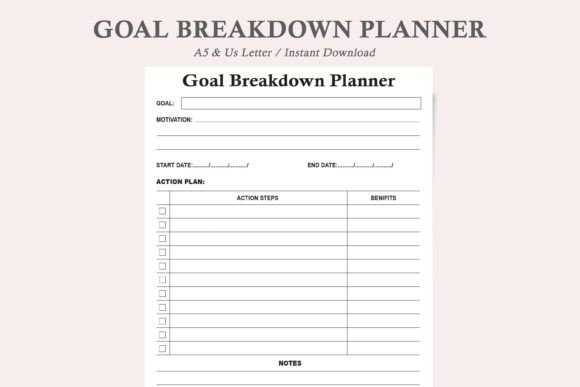
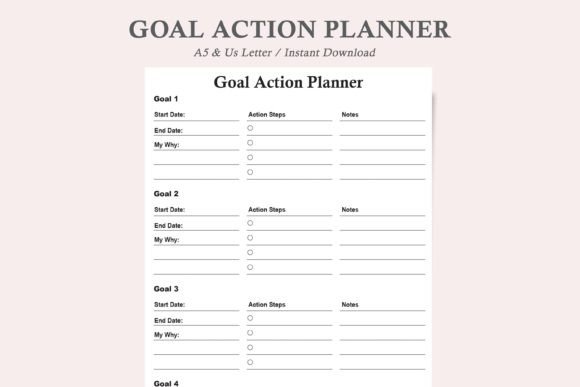
The product details mention two sizes: US Letter and A5. That choice matters more than you might think. A busy freelancer who carries a planner in their bag might prefer the compact A5, while someone who works at a desk all day might want the larger US Letter for more space. If you choose a size that doesn’t fit your daily routine, you’ll avoid using it.
How to avoid it: Consider when and where you’ll actually use the Goal Action Planner. Will you be at a desk, out and about, or both? If you’re a student or commuter, A5 is portable. If you’re planning a complex project with many subtasks, US Letter gives you room to breathe. The good news is that this Action Planner comes in both sizes, so you can pick what fits. Also note that having both PDF and JPEG versions means you can print on demand—no need to commit to a bound notebook that may not fit your style.
4. Overlooking the Power of Ink‑Friendly and Professional Design
Some planners look beautiful but are impractical. Heavy graphics, dark backgrounds, or complex layouts can eat up printer ink and make the page feel cluttered. The Goal Action Planner described includes a professional, minimalist, and ink‑friendly design. This isn’t just a nice feature—it directly affects how often you’ll use the planner. If printing a new page costs you a lot of ink or feels visually overwhelming, you’ll be less likely to reprint when you need a fresh template.
How to avoid it: Look for a design that balances clarity with simplicity. A minimalist layout lets the content—your goals and actions—stand out. The clean lines also make it easier to scan your tasks quickly. Before buying any planner, check whether it works for both digital use (if you plan to fill it on a tablet) and print.
What to Check Before You Download or Buy a Goal Action Planner
Before you click “purchase” or hit print, take a moment to verify a few things. Many people grab a planner impulsively and later discover it doesn’t suit their workflow.
- File format compatibility: The Goal Action Planner offers PDF and JPEG files. PDFs are great for printing and for using annotation apps like GoodNotes or Notability. JPEGs can be imported into image‑based apps or printed directly. Make sure your device or software supports your preferred format.
- Size choices: As mentioned, US Letter and A5 serve different needs. If you print at home, US Letter is standard in North America; A5 is popular worldwide and fits many binders. Some users print both sizes—one for home and one for on‑the‑go.
- Print vs. digital: Decide upfront if you want to handwrite your goals or type them. A digital download lets you reprint as many times as needed, which is ideal if you like to use a fresh page for each goal cycle. If you prefer to keep everything in one digital file, the PDF version works well with fillable form tools.
- Design balance: A planner that looks good but has too little space for writing will frustrate you. Look at the sample pages: is there enough room to list actions and notes? The minimalist design should still give you plenty of lines and checkboxes.
Practical Advice: How to Make Your Action Planner Work Consistently
Once you have your Goal Action Planner in hand, the real work begins. Here’s a simple routine that experienced planners use:
- Start with one goal. It’s tempting to fill out every page for every dream. Instead, pick your most important goal for the next 90 days. Write it at the top of your Action Planner template.
- Break it into monthly milestones. For example, if your goal is to launch a podcast, month one could be planning and equipment, month two recording and editing, month three publishing and promotion.
- List weekly actions. Each week, decide on three to five concrete actions that move you forward. Track them daily or weekly using the progress section.
- Review and adjust. At the end of each month, look at what worked and what didn’t. Modify your milestones or actions accordingly. The Goal Action Planner is a living document, not a fixed contract.
- Celebrate small wins. When you complete a milestone, check it off. That visual progress is motivating and reinforces the habit of using your planner.
A Real‑World Example: From Vague Idea to Completed Project
Let’s say you want to start a side hustle selling handmade candles. The vague goal is “start a candle business.” Using a Goal Action Planner, you would write:
- Goal: Launch an online candle shop with a minimum of 10 products by June 30.
- Monthly milestones: March – research recipes and test 5 wax blends; April – create 10 final products and design labels; May – set up Etsy shop and photograph products; June – launch and promote.
- Weekly actions (first week): Watch 2 candle‑making tutorials, order wax and fragrance samples, test one blend, set up a workspace.
Without the planner, you might buy supplies randomly and lose motivation. With it, each week has a clear action. The Action Planner keeps you from getting overwhelmed because you focus on just the next step.
Final Thoughts for Consistent, Effective Goal Tracking
Using a Goal Action Planner is not about perfection—it’s about direction. You will miss tasks some weeks. You may adjust your goal. That’s fine. The planner is there to help you notice the adjustments and keep moving. The best Action Planner is the one you actually use. By avoiding vague goals, committing to regular reviews, choosing the right format, and keeping the design simple, you set yourself up for real progress.
Whether you are a professional mapping quarterly objectives, a student balancing coursework and personal projects, or a hobbyist learning a new skill, a dedicated Goal Action Planner provides the structure your ambition needs. Before you download or print, take a moment to check the size, format, and layout. Then start with one clear goal. You’ll be surprised how much you can achieve when you have a simple system that turns your intentions into actions—day after day.